SELECT region, SUM(revenue) FROM sales.orders GROUP BY region ORDER BY 2 DESC;
Chat with your Snowflake data warehouse in plain English
Connect Snowflake to your Kanaries workspace and ask questions the way you would ask a colleague. The AI assistant writes the SQL, runs it, and answers with charts — no worksheet tabs, no waiting on the data team.
snowflake://your-account → kanaries.workspace·credentials stored encrypted
how it works
One session. Three steps.
From connection string to answered question, everything happens inside the Kanaries workspace.
01 · connect
Point Kanaries at your Snowflake account
Enter your account, user, and database. Kanaries connects securely and brings your tables into the workspace — no drivers to install, nothing to export.
workspace — new connection (snowflake) 
02 · model
Shape the data you want to talk about
Import the tables you need, or let the SQL assistant help you write a query across your databases and schemas. The result becomes a dataview — a clean slice of your warehouse, ready for conversation.
workspace — dataview (sql assistant) 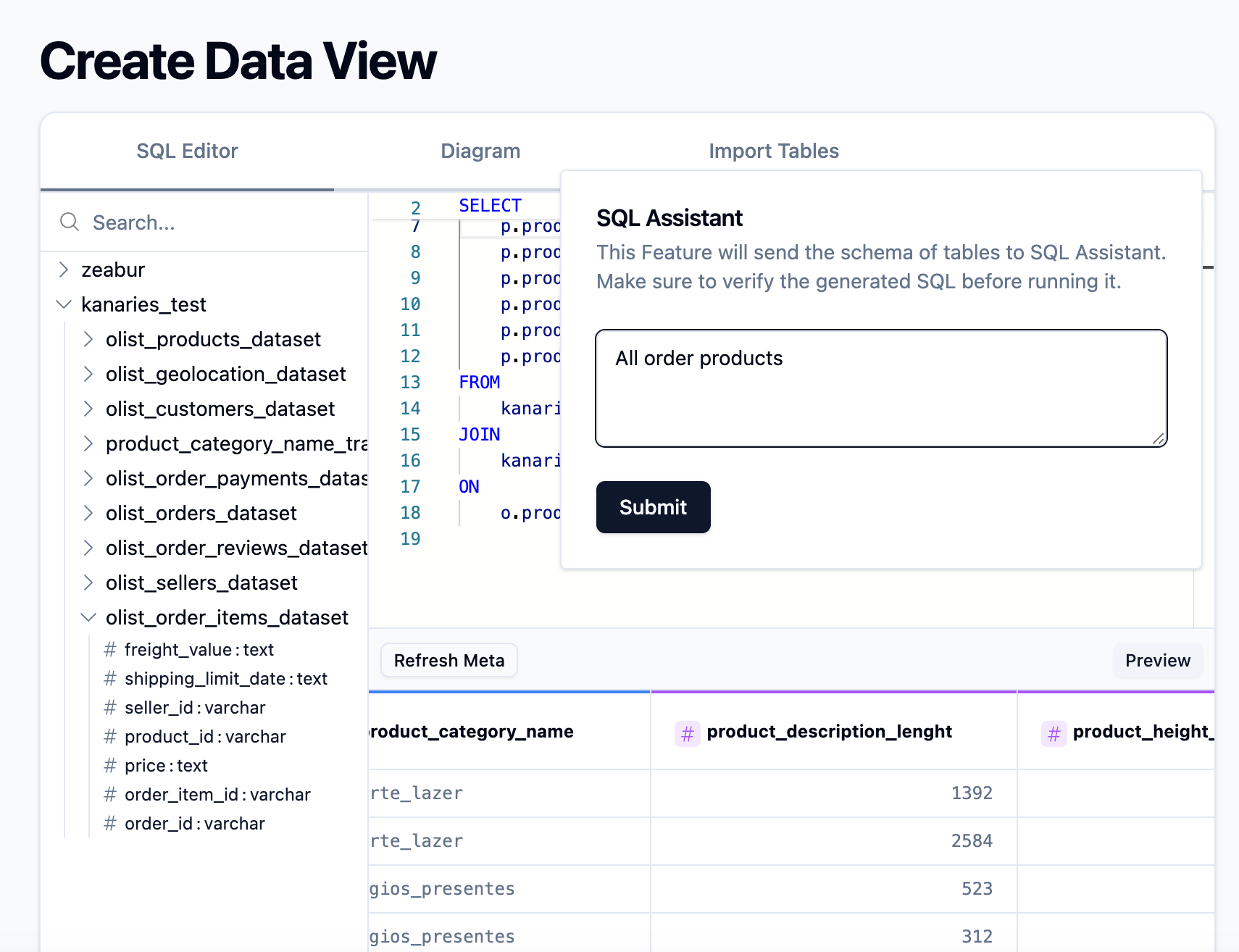
03 · ask
Ask questions, get charts back
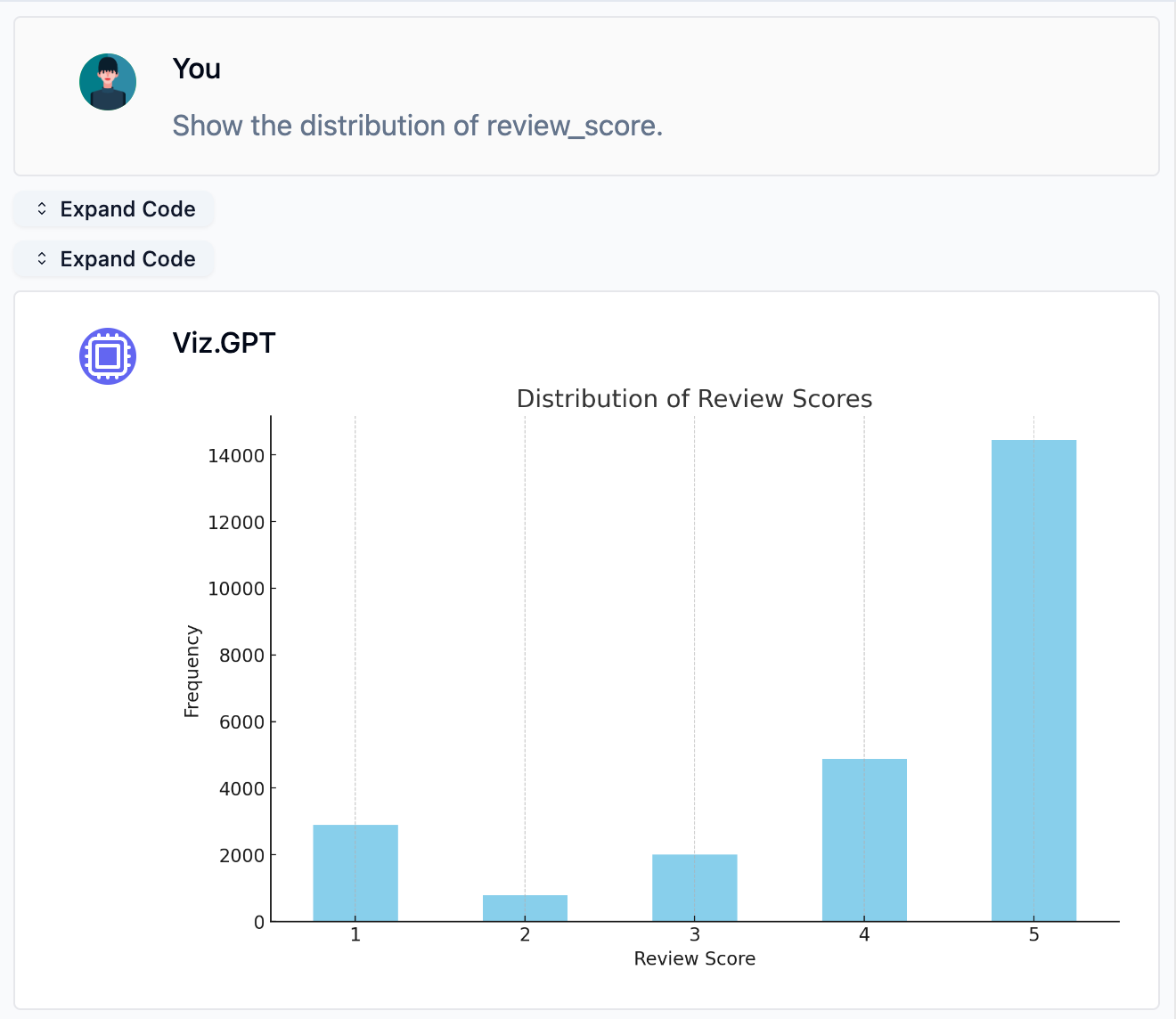
Open AIChat and ask in plain English. The assistant writes the SQL, runs it against your dataview, and replies with charts and summaries you can drop straight into your next report.
aichat — analytics session
why chat
Why chat beats the query editor
[input]
Plain-English querying
Ask "Show revenue by region this quarter" or "Which customer segment grew fastest?" — natural language in, real query out. No window-function wrestling between you and your answer.
[output]
Charts, not just result sets
The assistant pairs an LLM with a code interpreter, so answers arrive as professional visualizations built from your live Snowflake data — not as walls of rows to squint at.
[trust]
Your credentials stay yours
Connection details are encrypted in transit and at rest. The assistant only touches the dataviews you define, so you decide exactly which slice of the warehouse joins the conversation.
faq
Questions, answered
Can't find what you're looking for? Reach our team from the contact page and we'll get back to you.
Do I need to know SQL to chat with my Snowflake data?
+
No. You ask questions in plain English — like "Show revenue by region this quarter" — and the AI assistant writes the SQL, runs it against your warehouse, and answers with charts and summaries. If you do know SQL, the SQL assistant is there when you want to shape a dataview yourself.
How do I connect Snowflake to Kanaries?
+
Enter your Snowflake account, username, password, and the database you want to explore in the workspace. Kanaries establishes the connection securely, and you can then import the tables you need or query a slice of your data into a dataview.
Is my Snowflake connection information secure?
+
Yes. Connection details are encrypted in transit and stored encrypted, so your credentials remain private and protected.
Can I control which tables the assistant can see?
+
Yes. The assistant works against dataviews, and a dataview only contains the tables you import or the query results you build with the SQL assistant — the rest of your warehouse stays out of the conversation.
What types of charts can the assistant generate?
+
Bar charts, line charts, scatter plots, histograms, pie charts, and more — the assistant picks a sensible visualization for your question, or you can ask for a specific chart type.
How accurate are the answers?
+
The assistant pairs a large language model with a code interpreter, so answers come from real queries executed against your actual data, not from guesswork. For complex questions, refining your prompt or narrowing the dataview improves results.
also speaks
The same conversation, other databases
snowsql> !quit
Leave the SQL to the assistant
Close the worksheet, keep the answers. Connect your Snowflake warehouse and ask your first question in minutes.